Overview
Markdown formatting has gained immense popularity for its simplicity and versatility, especially for creators looking to produce rich text content effortlessly. The bm.md Markdown editor takes this to the next level by providing an array of features that enhance the user experience and adaptability across multiple platforms. Whether you’re writing for social media, websites, or other digital mediums, this tool is designed to streamline the markdown formatting process.
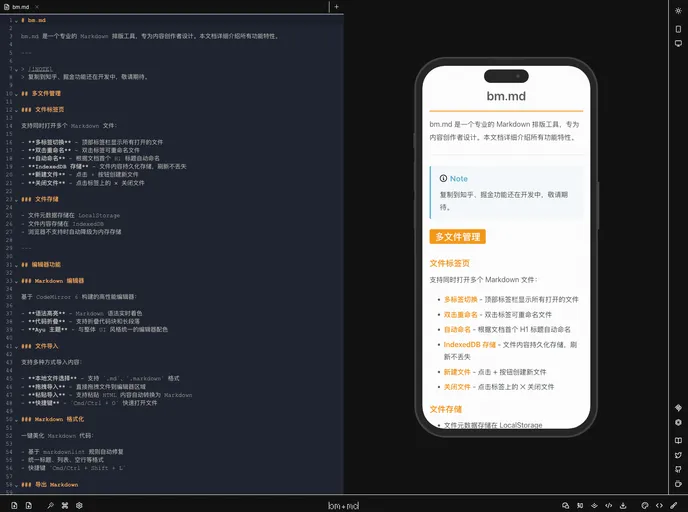
This Markdown editor stands out with its real-time preview feature, various styling options, and seamless integration capabilities. Designed for both novices and experienced developers, it caters to a wide audience by allowing quick adaptations for diverse occasions and platforms.
Features
- Real-Time Preview: Enjoy a live view of your markdown as you edit, thanks to the CodeMirror 6-based editor that allows for a seamless WYSIWYG experience.
- 14 Styling Options: Choose from a range of 14 different formatting styles, from professional to nostalgic, ensuring that your content meets specific context needs.
- Multiple Code Themes: Benefit from 14 distinct code highlighting themes, supporting both light and dark modes to fit your visual preference.
- Platform Compatibility: Easily copy your content for use across multiple platforms like WeChat, enhancing the sharing process without hassle.
- Image Export: Simplify your content sharing by exporting your formatted text as images, perfect for presentations or social media.
- Developer-Friendly: Incorporate the tool into your projects effortlessly with REST API and MCP protocol integration available for developers.
- Efficient Shortcuts: Speed up your workflow with a command panel and global keyboard shortcuts designed for quick navigation and operations.