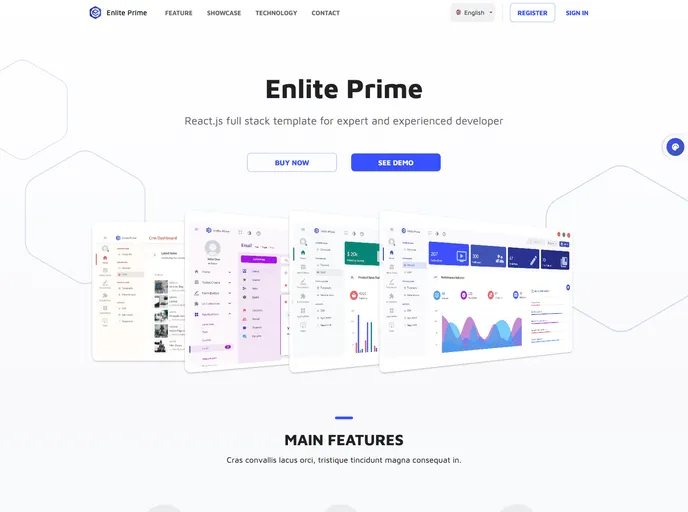
Enlite Starter screenshot

Enlite Starter

Author Avatar Theme by Ilhammeidi
Updated: 6 May 2025
40 Stars

Enlite Starter - React Dashboard Starter Template with Firebase Auth

Categories

Overview:

Enlite Starter is a React Admin Dashboard Template designed for Full-Stack Developers. It offers a range of features and functionalities that make it suitable for building web applications. The template is built with ReactJS and Redux, making use of modern technologies. It includes premium designs with simple and elegant theme colors, as well as dark and light modes. The template supports multiple layouts, including sidebar and topbar navigation layouts, and also provides RTL (right-to-left) support. Authentication is handled using Firebase social and email login. Additionally, Enlite Starter offers pre-built apps, support for multiple languages, and more than 30 reusable and easy-to-modify React components and modules.

Features:

  • Modern Technologies: Built with ReactJS and Redux, two popular JavaScript libraries.
  • Premium Designs: Simple and elegant theme colors, with dark and light modes.
  • Multiple Layout and RTL Support: Choose between sidebar and topbar navigation layouts, with automatic RTL adjustment styling.
  • Authentication: Use Firebase for social and email login.
  • Pre-built Apps: Includes a sample CRUD app with Redux-Saga and Realtime DB integration.
  • Multilanguage Support: Includes 6 translations - English, Deutsch, Arabic, Chinese, Bahasa Indonesia, and EspaƱol.
  • 30+ React Components and Modules: Reusable and easy to modify.
  • Various Sample Pages: Landing page, 2 dashboard variants, and more.
  • Next Generation JavaScript: Written in ES6.
  • Responsive Design: Based on the standard 12 Grid System.
  • Starter Project: Build apps from scratch without being distracted by innate features.
  • Test Unit: Material UI Components functional test with Mocha and Chai.
  • High Performance: Styling with JSS (CSS in JS) and Async Code Splitting.
  • Clean Code: Maintained by eslint.
  • Fully Vector Icons and Font Icons.
  • Direct Code Preview: Get source code easier without opening files.

Installation:

To install Enlite Starter:

  1. Clone this project.
  2. Install module dependencies by running this script in the terminal: npm install.
  3. After the download finishes, build Webpack DLL dependencies (if necessary) by running: npm run build:dll.
  4. Start the app by running: npm start.
  5. Navigate to http://localhost:3001.

Summary:

Enlite Starter is a React Admin Dashboard Template that offers a range of features and functionalities for building web applications. It is built with ReactJS and Redux, making use of modern technologies. The template provides premium designs, multiple layouts, and RTL support. It also includes authentication using Firebase, pre-built apps, multilanguage support, and a variety of reusable React components. With its responsive design and high performance, Enlite Starter is suitable for building robust and visually appealing web applications.