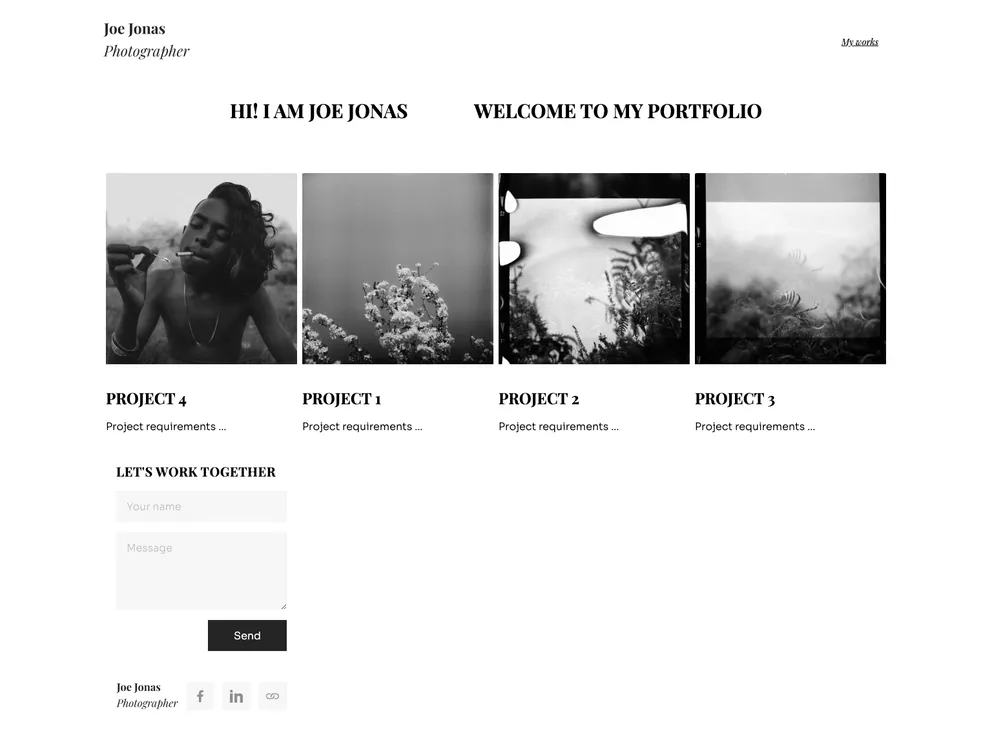
Flotiq starter for creating a project portfolio with gatsby
This document is an analysis of a Gatsby starter for a projects portfolio with Flotiq source. The starter is a boilerplate that provides the necessary Gatsby configuration files to quickly set up and run a React app. It utilizes Flotiq, a headless CMS, to store and retrieve data. The project also incorporates Tailwind, a utility-first CSS framework, and Flotiq components for react, a components library designed to work seamlessly with Flotiq Content Objects.
To install the Gatsby starter for a projects portfolio with Flotiq source, follow these steps:
flotiq new projectName --template flotiq-gatsby-portfolio-1
Replace “projectName” with the desired project path. To start the project in the current directory, use “.”.
flotiqApiKey=YOUR_API_KEY
Replace “YOUR_API_KEY” with the read and write API key for your Flotiq account.
npm install
flotiq import
Make sure to replace “YOUR_API_KEY” in the .env.development file with your actual API key.
gatsby develop
The Gatsby starter for projects portfolio with Flotiq source is a boilerplate that provides the necessary configuration files and tools to quickly set up a Gatsby project for a project portfolio. It leverages Flotiq, a headless CMS, to store and retrieve data, while utilizing Tailwind for styling and Flotiq components for React for an optimized user interface. The installation process involves using Flotiq CLI to create the project, setting up environment variables, installing dependencies, importing example data (optional), and starting the development server. Managing content is made easy through the Flotiq editor. Development and production updates to the data require specific commands to be run to ensure the changes are reflected in the project. Hosting services like Gatsby Cloud, Netlify, and others can simplify the process of updating data in production.

