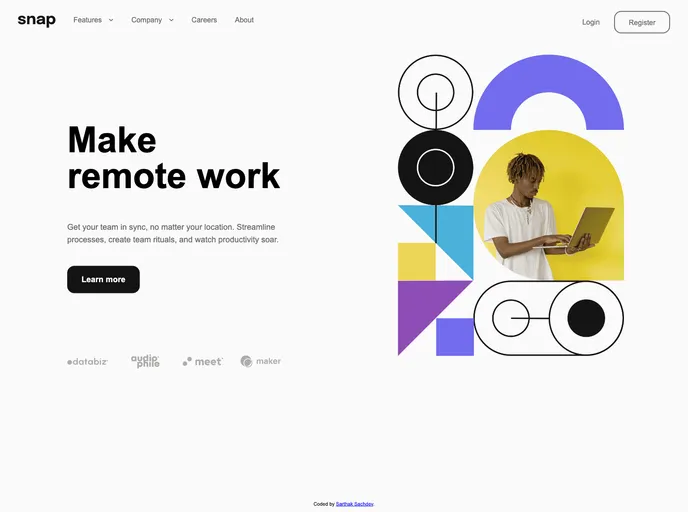
Intro Section With Dropdown Navigation_frontend_project screenshot

Intro Section With Dropdown Navigation_frontend_project

Updated: 10 Oct 2024
11 Stars

Explore our website seamlessly with the Intro Section featuring Dropdown Navigation! This component allows users to view the relevant dropdown menus on desktop and mobile when interacting with the navigation links, ensuring an optimal layout for the content depending on their device's screen size.

Categories

Overview

The Intro Section with Dropdown Navigation is an innovative component designed to enhance user experience on websites by providing a seamless navigation interface. It caters to both desktop and mobile users, ensuring that the dropdown menus are intuitive and easy to interact with regardless of the device being used. This project not only showcases the importance of responsive design but also emphasizes clarity and accessibility in digital navigation.

By leveraging modern web development practices, this project highlights key features such as hover states for interactive elements to ensure users receive visual feedback as they navigate. It’s a splendid example of how thoughtful design can significantly improve the overall user journey on a site.

Features

  • Responsive Design: Adapts seamlessly to various screen sizes, ensuring users have optimal navigation on both desktop and mobile devices.
  • Dropdown Menus: Interactive dropdown menus that display relevant options, making navigation more straightforward and efficient.
  • Hover States: Visual feedback for interactive elements, enhancing the user’s navigational experience and making the interface more engaging.
  • Easy Setup: Simple steps to clone the repository and run the project locally, making it accessible for developers at any skill level.
  • Optimized Assets: All required design assets are pre-optimized and ready for implementation, saving developers time.
  • Educational Value: A beneficial resource for revising a wide array of CSS and JavaScript concepts, fostering learning and growth in web development skills.
  • Comprehensive Style Guide: Includes a detailed style guide with information on color palettes and fonts, simplifying the design process.