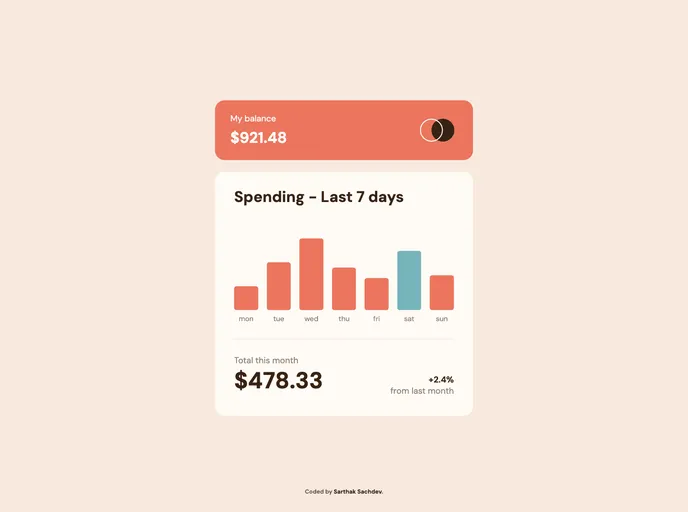
Introducing the Expenses Chart Component, your ultimate expenses tracker! Experience the optimal layout on any device screen size and interact with hover states for all elements on the page. Dive deeper into your financial insights with the Expenses Chart Component today!
Creating an Expenses Chart Component is an essential step for anyone wanting to effectively track their spending habits. This component not only provides a visual representation of data but also enhances user engagement through interactive features. The aim is to allow users to easily view their expenses over time, making financial management simpler and more intuitive.
This chart component is designed with responsiveness in mind, ensuring that it looks great and functions well on any device. By integrating features like hover effects and dynamic data generation from a JSON file, it offers a rich user experience that can cater to diverse user needs.
Interactive Bar Chart: Users can easily visualize their expenses with a clear and engaging bar chart that displays spending amounts for different days.
Hover Effects: Hovering over the individual bars reveals the exact amount spent for each day, providing immediate feedback without cluttering the interface.
Highlight Current Day: The current day’s expenses are distinctively highlighted, allowing users to quickly identify their spending patterns.
Responsive Design: The layout adapts seamlessly to various device screen sizes, ensuring a consistent experience whether on a desktop, tablet, or mobile device.
Dynamic Data Generation: Bars are dynamically generated based on expense data pulled from a local JSON file, making the component adaptable to different datasets without manual updates.
Optimized Assets: All necessary images and assets are pre-optimized for web use, improving load times and performance without sacrificing quality.
Comprehensive Style Guide: A detailed style guide is provided, featuring the color palette and fonts to maintain consistency throughout the application’s visual design.
Ongoing Development Insights: The creator shares lessons learned throughout the process, with a focus on improving essential web development skills, ensuring continuous growth and adaptation in coding practices.

